I had 50GB of invisible junk on my MacBook. The storage bar was pinned red, but I couldn't see anything to delete. So I downloaded Hermes Agent, and the first thing I typed was:
"Can we look at my disk space and my storage and see what we can delete safely so I can have more storage space?"
That single question turned into one conversation that reclaimed ~50GB — my disk went from 43% used to ~30%. No "cleaner" apps, no typing commands myself. Here's the exact run, so you can do the same.
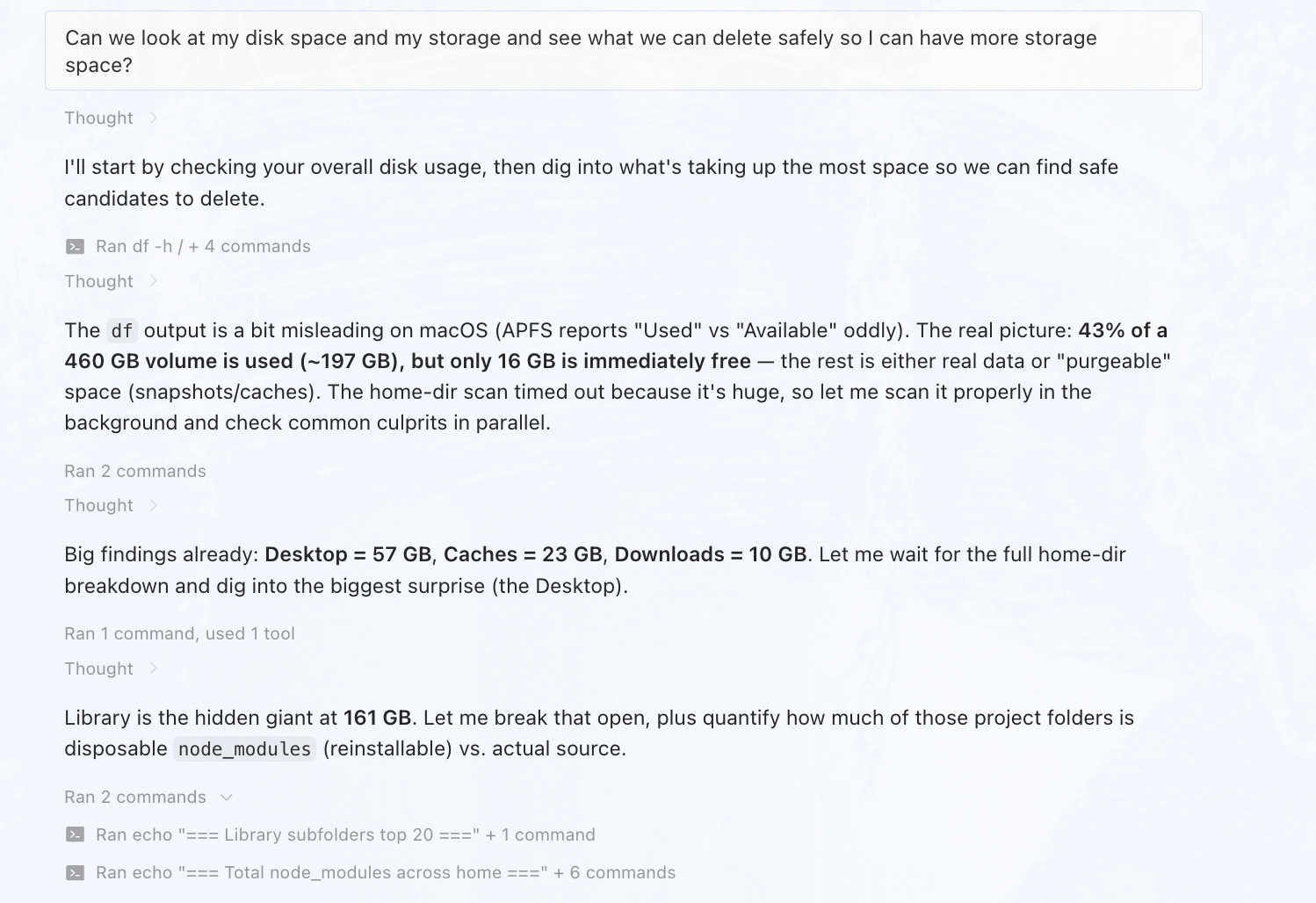
One message in. Hermes immediately starts checking disk usage and digging into what's taking the most space.
Step 1: Ask the one question
The opener above is all you need. Hermes started by checking overall disk usage, then dug into what was taking the most space. On macOS the df output is a little misleading — APFS reports "Used" vs "Available" oddly — so it explained the real picture:
- —Volume: 460 GB, ~197 GB used but only ~16 GB actually free. The rest is real data or "purgeable" space (snapshots/caches APFS holds onto).
- —Your home folder alone was ~250 GB.
Because the home folder was huge, the first scan timed out, so Hermes re-ran it properly in the background and checked the common culprits in parallel. Early findings: Desktop = 57 GB, Caches = 23 GB, Downloads = 10 GB. The biggest surprise was the Desktop being full of dev project folders.
Step 2: Let Hermes break open ~/Library
The hidden giant turned out to be ~/Library at 161 GB. Hermes opened it up and quantified each bucket:
| Bucket | Size | What it is |
|---|---|---|
| ~/Library/Application Support | 88 GB | App data — Cursor 11, Comet 11, Google 10, Claude 7.3, Notion 6.7, etc. |
| ~/Library/Developer | 35 GB | Xcode derived data (23) + CoreSimulator runtimes (12) |
| ~/Library/Caches | 23 GB | Browser/app caches (Arc, Brave, Vivaldi, OperaGX, Firefox, zen, Spotify…) + Playwright 2.5 |
| ~/Desktop/* Projects | 46 GB | Dev projects — ~12.9 GB of that is node_modules (reinstallable) |
| ~/Downloads | 10 GB | Mostly .dmg/.zip installers, many redundant |
| ~/Library/Group Containers | 9 GB | WhatsApp media 7.8 GB, Google Drive 0.99 |
The command shape behind this is just a measured du across the home folder — Hermes sizes each bucket before touching anything:
df -h /
du -sh ~/Library/Application\ Support ~/Library/Developer ~/Library/Caches ~/Library/Group\ Containers ~/Desktop ~/Downloads
Step 3: The tiered breakdown
This is the part that makes it safe. Instead of "delete everything," Hermes grouped the junk into tiers by risk:
- —Tier 1 — 100% safe, regenerates automatically (~36 GB):
~/Library/Caches/*(23 GB, apps rebuild them) andnode_modulesin your project folders (12.9 GB,npm installbrings them back). - —Tier 2 — redundant / already-installed (~8 GB):
~/DownloadsDaVinci Resolve.zip+.dmg(7.6 GB — the app was already in/Applications), duplicate DMGs (bookmrkr ×2,MagicPath ×2), old screen recordings, plus a stray~/Desktop/Framer.app(257 MB) copy of the real app. - —Tier 3 — caution, confirm first: WhatsApp media (7.8 GB, local copies also on your phone/iCloud), CoreSimulator (12 GB of iOS simulators — safe if you don't do iOS dev), and Xcode DerivedData (regenerates on build).
- —Don't touch: actual project source,
/Applications/Xcode.app, and any~/Library/Application Support/*chat history you might want.
Step 4: Pick your aggression level
Hermes stopped and asked how aggressive to be — it wouldn't delete anything until I picked. I chose:
"Safe only — Tier 1 + 2 caches, node_modules, redundant installers (~44 GB), skip personal data"
That scoped the cleanup to ~44 GB of recoverable space with zero personal data touched.
Step 5: Hermes does the deletions
Hermes snapshotted free space, ran the deletions, then confirmed the reclaim. The bulk win was the 23 GB of caches + ~13 GB of node_modules + the 7.6 GB DaVinci installers + the stray Framer copy.
The command shape for the safe clear is just targeted removals — Hermes only deletes what you approved:
# Tier 1 — caches (apps rebuild these)
rm -rf ~/Library/Caches/*
# Tier 1 — reinstallable dependency folders
find ~/Desktop -name node_modules -type d -prune -exec rm -rf {} +
# Tier 2 — redundant installers + stray app copy
rm -rf ~/Downloads/DaVinci\ Resolve*.dmg ~/Downloads/DaVinci\ Resolve*.zip
rm -rf ~/Desktop/Framer.appStep 6: Verify the reclaim
Hermes re-ran df -h / to close the loop: ~50 GB reclaimed — 15 GiB → 65 GiB free of 460 GiB, and the disk dropped from 43% used to ~30%.
Optional second pass (Tier 3)
Want even more? Hermes offered a follow-up pass at the Tier 3 items — WhatsApp media (7.8 GB), unused iOS simulators (12 GB), and Xcode DerivedData. Those would free another ~20–30 GB but touch things you might actually use, so it left them for you to confirm.
Safety guardrails
The reason this stayed safe:
- —Measure before delete. Hermes mapped every bucket and showed sizes before touching a file.
- —Tiered by risk. You only approved Tier 1 + 2; personal data and app binaries were off-limits.
- —It asked first. Nothing moved until you picked an aggression level.
- —SIP is your backstop. System-managed caches can't be deleted even by accident.
Next steps
You now have a repeatable routine: ask the one question → review the tiers → pick your aggression → verify. Run it every month or two and the red bar stays gone. If you'd rather not repeat the prompts, ask Hermes to save a reusable "Mac storage cleanup" command pack you can re-run on demand.